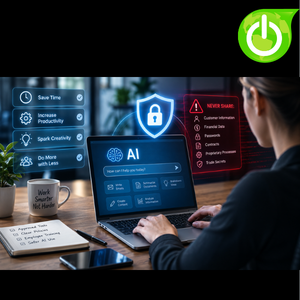
 Artificial intelligence is no longer just a tool for large corporations with massive technology budgets and teams of developers. Small and mid-sized businesses are using AI every day to save time, improve productivity, create content, analyze information, and accomplish more with fewer resources. And that can be a very good thing. But there is an important question every business owner should be asking: Are we using AI safely?
For many businesses, the biggest risk isn’t artificial intelligence itself. It’s what employees may accidentally put into it. An employee might use an AI chatbot to rewrite an email, summarize a document, analyze a spreadsheet, or brainstorm ideas. The intent may be completely innocent. But if that employee copies confidential customer information, financial data, passwords, contracts, proprietary processes, or sensitive employee information into an AI tool without understanding how that information is handled, the business could create unnecessary security and privacy risks.
The answer isn’t to ban AI. The answer is to use it smarter.
Your Employees May Already Be Using AI
Here’s something every business should consider: If you haven’t officially approved an AI tool for your employees, that doesn’t mean they’re not using one.
Employees can easily access AI tools on their computers, phones, and web browsers. They may be using ChatGPT, Microsoft Copilot, Google Gemini, or another AI platform they discovered on their own. They may also be using AI features built directly into applications the company already uses. Most employees aren’t trying to create a security problem. They’re trying to get their work done.
Someone may paste an email into an AI chatbot and ask it to make the message sound more professional. Another employee may upload a spreadsheet and ask AI to identify trends. A marketing employee may use AI to brainstorm campaign ideas. An employee might even paste a customer document into an AI tool because they want a quick summary. To the employee, these may seem like harmless productivity shortcuts. The problem is that they may not understand what information they’re sharing or what the implications could be. That’s why businesses need to get ahead of AI use instead of pretending it isn’t happening.
The Problem Isn’t AI. It’s How You Use It.
It’s easy to look at artificial intelligence and think, “AI is dangerous.” That’s an oversimplification. AI can be an extremely useful business tool. It can help employees work faster, reduce repetitive tasks, improve communication, and generate ideas. For a small business with limited resources, those benefits can be significant.
The bigger concern is how AI is being used, what information employees are entering, and whether the business has established appropriate controls.
Think about the information your business handles every day. Customer records, financial information, contracts, employee information, pricing, passwords, internal communications, business plans, proprietary processes, and other confidential data can all be extremely valuable. Now imagine an employee copying some of that information into an AI tool simply because they want help organizing it. The employee may have had the best intentions. But without appropriate policies and approved tools, your business may have just created a data privacy or confidentiality concern.
AI doesn’t remove your responsibility to protect your information.
What Should Employees Keep Out of AI?
Your employees don’t need to memorize a complicated 50-page AI policy to understand the basics. They simply need clear guidance about what information should never be entered into an AI tool without specific approval.
Passwords and login credentials should obviously stay out of AI chatbots. The same goes for Social Security numbers, credit card information, bank account information, confidential customer records, sensitive employee information, private contracts, proprietary business information, trade secrets, and other confidential material. A good rule of thumb is simple: If you wouldn’t casually post the information online or send it to someone outside the company, don’t casually paste it into an AI tool.
That doesn’t mean AI can never be used with business information. There are legitimate business applications where organizations may want AI to work with internal data. But those situations require the right tools, settings, permissions, security controls, and policies. The important thing is that employees shouldn’t be making those decisions on their own.
Don’t Ban AI. Build Guardrails.
Some businesses may be tempted to respond to AI by simply saying, “Nobody is allowed to use it.” That might sound like the safest approach, but it may not be realistic. AI is becoming part of everyday software and everyday work. Employees are going to encounter it whether your company has an official AI strategy or not.
Instead of trying to put AI back in the box, businesses should establish reasonable guardrails. Think of it like driving. You don’t tell your employees that cars are dangerous and nobody is allowed to drive. You establish rules for using them safely. AI needs the same kind of practical approach.
Employees should understand which tools are approved, what information can be entered, what information is prohibited, and what to do when they aren’t sure. The goal isn’t to stop employees from using AI. The goal is to make sure they’re using it responsibly.
Start With Approved AI Tools
One of the easiest places to start is by establishing a list of approved AI tools. Instead of allowing employees to use any AI website they find, determine which platforms make sense for your business and understand the security and privacy considerations associated with them.
Different departments may have different needs. Marketing may use AI for brainstorming and content creation, while operations may use it for organizing information. Your accounting team may have completely different requirements. The important part is that your business knows what tools are being used.
Approved tools also make training easier. Your IT team knows what employees are working with, your security team understands what needs to be protected, and your employees know where they should go when they need an AI assistant. You can’t manage what you don’t know about.
Create an AI Acceptable-Use Policy
Once you’ve determined which AI tools are appropriate, put some basic rules in writing. Your AI acceptable-use policy doesn’t need to be complicated. In fact, the simpler it is, the more likely employees are to actually follow it.
The policy should answer practical questions such as:
- Which AI tools can employees use?
- What information can they enter?
- What information is prohibited?
- Can AI-generated content be sent to customers?
- Can employees use AI for HR-related tasks?
- Can customer information be entered into an AI application?
- Who should employees contact if they’re unsure?
The goal isn’t to create another giant policy document that gets filed away and forgotten. The goal is to remove the guesswork. Employees should not have to wonder whether they’re allowed to use AI or whether a particular piece of information is safe to upload. Even the best AI policy won’t help if employees don’t understand it.
Fortunately, your employees don’t need to become AI experts. They don’t need to understand how artificial intelligence works behind the scenes or know the technical details of how AI models are developed.
They simply need to understand the basics.
They need to know that AI can make mistakes. They need to understand that information entered into an AI tool may require special consideration. They need to recognize that popular doesn’t automatically mean approved. And they need to know that confidential information should never be casually pasted into an AI chatbot.
Training can be simple and practical. Show employees examples of appropriate and inappropriate AI use. Explain what types of information are considered confidential. Give them approved tools to use and provide an easy way to ask questions. The goal isn’t to create perfect AI users. It’s to create informed employees.
Use AI for Low-Risk Tasks
There are countless ways businesses can use AI without putting sensitive information at unnecessary risk. Employees can use AI to brainstorm ideas, create outlines, draft generic emails, develop marketing concepts, summarize non-confidential information, organize thoughts, and generate first drafts.
For example, an employee who needs ten ideas for a social media campaign can ask AI to brainstorm them. A manager preparing a presentation can ask AI to create an outline. An employee writing a general customer announcement can ask AI for a starting point. These are relatively low-risk uses when no confidential information is being entered.
The key is understanding the difference between using AI to help create something and using AI to process sensitive business information. You can get significant productivity benefits without handing over your company’s most valuable information.
Be Careful With Customer Information
Customer information deserves special attention. Imagine an employee receives a complicated customer email and wants AI to help draft a response. They copy the entire email into a chatbot and ask, “Can you write a professional response?” It sounds harmless. But what was in the email? Maybe a phone number. Maybe an account number. Maybe financial information. Maybe a contract. Maybe confidential details about the customer’s business.
The employee may not have stopped to think about the information contained in that email because their focus was simply on getting the response written. That’s why employee training and clear policies matter.
Customer information should receive the same level of protection whether it’s stored in your CRM, sitting in your email inbox, or being copied into an AI tool. The location of the data doesn’t change its sensitivity.
Be Careful With Employee Information
The same principle applies to employee information. AI may appear to be a convenient way to help with HR-related tasks, but employee information can be highly sensitive. Performance reviews, compensation information, personal details, disciplinary records, and other confidential employee information should not simply be copied into an AI tool because someone wants help rewriting a document.
If your organization plans to use AI for sensitive HR, financial, legal, or operational processes, those uses should be evaluated first. The business should understand what tool is being used, how the information is handled, what controls are available, and who has access. Convenience shouldn’t outrun common sense.
Remember: AI Can Be Wrong
There is another risk that businesses sometimes overlook. AI can be wrong. And perhaps more importantly, AI can be wrong while sounding extremely confident.
An AI-generated answer can look polished and professional while containing inaccurate information. It can misunderstand a question, leave out important details, provide outdated information, or generate facts that aren’t actually true. That’s why employees should treat AI as an assistant, not an authority.
If AI generates customer-facing content, someone should review it. If it summarizes information, someone should be able to verify the summary against the original. If it provides information that will be used to make an important business decision, that information should be independently checked.
AI can help employees work faster. It doesn’t eliminate the need for human judgment. Trust it as a tool. Verify it as information.
Don’t Let AI Make Important Decisions Alone
AI can help organize information, identify patterns, and provide recommendations. But businesses should be thoughtful about allowing AI to make important decisions without human oversight. The more significant the decision, the more important human review becomes.
If AI is being used to assist with hiring, financial decisions, legal matters, customer issues, employee evaluations, or other high-impact processes, businesses should carefully consider the risks and requirements involved.
AI should support your employees, not become an excuse to stop thinking critically. Someone needs to remain accountable for the final decision. The technology can assist. The business still owns the decision.
Watch Out for “Free” AI Tools
Free AI tools can be tempting. An employee finds a website, creates an account, uploads a document, and gets the answer they need in seconds. The problem? Your business may have no idea what just happened.
This is one reason “shadow AI” can become a concern. Employees may begin using AI applications without involving IT or management simply because the tools are easy to access.
Again, the answer isn’t necessarily to block everything. Instead, understand what employees need and provide safe, approved alternatives. If your employees have secure tools that help them accomplish their jobs, they’re less likely to go searching for random AI applications on the internet.
Make AI Part of Your Security Strategy
AI shouldn’t exist in a separate technology universe. It should become part of your broader cybersecurity and technology conversations.
Your IT team or MSP should understand what AI tools employees are using, which applications are approved, what types of information are being entered, how accounts are secured, and what policies and training are in place. Multi-factor authentication, access controls, security awareness training, and data protection remain important regardless of whether an employee is using AI.
The technology may change, but the fundamental security principles remain. Know what you’re using. Know what you’re protecting. Know who has access.
AI Can Be a Major Advantage for Small Businesses
With all of the discussion about AI risks, it’s important not to overlook the opportunity. Small businesses often have fewer employees and fewer resources than large corporations. AI can help close some of that gap by allowing employees to work more efficiently and accomplish tasks that might otherwise require significant time.
AI can help create content, organize information, brainstorm ideas, draft communications, summarize information, automate repetitive tasks, and support employees across many different areas of the business. That’s powerful. The goal isn’t to avoid AI because there are risks. The goal is to understand those risks and manage them.
Smart businesses don’t have to choose between productivity and security. They can work toward both.
Use AI Smarter. Not Riskier.
Artificial intelligence is moving quickly, and businesses don’t need to have every answer today. But they do need to start asking the right questions.
- What AI tools are our employees using?
- Which tools should we approve?
- What information can employees enter?
- What information should stay out?
- Do we have an AI acceptable-use policy?
- Have we trained our employees?
- Are we reviewing AI-generated information before relying on it?
- Do we have someone responsible for keeping our AI strategy up to date?
You don’t need to become an AI expert to create responsible AI practices. Start with the basics. Know what your employees are using. Establish clear rules. Approve appropriate tools. Protect sensitive information. Train your team. And keep humans involved in important decisions.
At Computing Technology Solutions (CTS), we help small and mid-sized businesses navigate the technology decisions that come with a rapidly changing digital world—including artificial intelligence. Whether you need help evaluating AI tools, creating an acceptable-use policy, educating employees, or putting the right security controls in place, CTS can help you build an AI strategy that supports productivity without ignoring security. The goal isn’t to tell your employees: “Don’t use AI.” It’s to give them the knowledge and tools to use it responsibly.
AI can be a powerful business advantage. Just make sure your business is in control of the technology, not the other way around.