 When your computer crashes, your network goes down, or an employee suddenly can’t access an important file, you need help. And you probably need it right away. But there’s a bigger question many businesses don’t think about until they’re already dealing with a technology problem: How are you managing your IT in the first place?
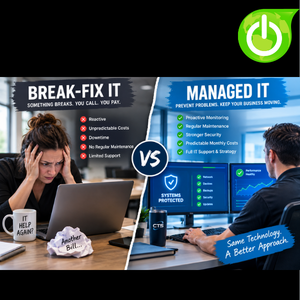
For years, businesses relied on a simple model called break-fix IT. Something breaks, you call an IT company, they fix it, and you get a bill. Simple, right? Not always. Break-fix IT can work for very small businesses with limited technology needs, but as a company grows, technology becomes more important to daily operations. Employees depend on email, cloud applications, accounting systems, file storage, customer management software, networks, phones, and countless other systems to do their jobs. When one of those systems stops working, the impact can go far beyond an IT repair bill.
That’s where Managed IT Services take a different approach. Instead of waiting for something to break, a managed service provider, or MSP, works proactively to monitor, maintain, secure, and improve your technology environment. Rather than simply responding when a problem occurs, your IT provider is continuously looking for potential issues and addressing them before they become larger disruptions. The goal isn’t to guarantee that nothing will ever go wrong. Technology isn’t perfect, and problems will happen. The goal is to catch problems earlier, reduce downtime, and make your technology more predictable.
What Is Break-Fix IT?
Break-fix IT is exactly what it sounds like. Something breaks, you call someone, they fix it, and you pay for the repair. You may not have an ongoing relationship with an IT provider, and there may be little or no regular monitoring, maintenance, security management, or long-term technology planning. If everything is working, you may not think about IT at all. When something stops working, that’s when you make the call.
For some very small businesses, that approach may seem reasonable. If you have only a few computers and rarely experience technology problems, why pay for ongoing IT services when nothing is broken? The appeal is obvious: you’re paying for help when you need it rather than paying a recurring monthly fee. But the challenge is that technology problems rarely happen according to your schedule. A computer doesn’t know you have an important presentation tomorrow. A server doesn’t care that you’re in the middle of your busiest month. A network outage doesn’t wait until you’ve finished an important project.
And when technology fails, the repair itself may only be part of the cost.
The Real Cost of Downtime
Imagine your network goes down on a Monday morning. Employees can’t access files, email isn’t working properly, your accounting system is unavailable, and customers are waiting for responses. Suddenly, everyone is asking the same question: “When is this going to be fixed?”
The longer the problem continues, the more it can affect your business. Employees may be unable to work. Customers may experience delays. Orders may be held up. Important projects may be pushed back. Your staff may spend hours trying to find workarounds or troubleshoot the problem themselves. And eventually, an IT professional has to be called in to diagnose and fix the issue.
Now you’re dealing with an IT repair bill and the cost of the downtime.
That’s one of the biggest challenges with break-fix IT. The cost of repairing the problem is easy to see. The cost of the disruption is often much harder to calculate. Depending on your business, even a few hours of downtime can have a significant impact.
The cheapest IT solution isn’t always the one with the smallest IT invoice.
Managed IT Takes a Different Approach
Managed IT is built around ongoing technology management rather than waiting for something to fail. An MSP can continuously monitor your systems, manage updates and patches, monitor backups, maintain security tools, support employees, and look for potential problems. Instead of discovering that something has been wrong for months because an employee finally calls, your IT provider can often identify the issue much earlier.
Think of it like maintaining your car. Break-fix IT is like waiting for your engine to die on the side of the road before calling a mechanic. Managed IT is more like getting regular oil changes, inspections, and maintenance so potential problems can be identified before they turn into a breakdown. Your car can still have problems even when you maintain it properly, but regular maintenance can reduce the likelihood of certain failures and help you catch issues sooner.
Your business technology deserves the same mindset. Don’t wait for the breakdown to start thinking about maintenance.
Predictable IT Costs
Another major difference between break-fix and Managed IT is how technology expenses are handled. With break-fix support, your IT costs can vary significantly from month to month. One month, you might barely need support. The next month, you could have a major computer failure, network problem, or server issue that creates a large unexpected bill. That can make it difficult to plan your technology budget.
Managed IT typically operates around a predictable monthly fee for an agreed-upon set of services. That doesn’t mean every possible technology expense is automatically included. Businesses may still have hardware purchases, software licensing costs, project expenses, or other technology investments. But having a predictable monthly IT expense can make budgeting much easier.
Instead of wondering how much your technology problems will cost this month, you have a clearer understanding of your ongoing IT investment. You can plan for larger technology projects, anticipate hardware replacements, and work with your IT provider to prioritize what needs to happen next.
Predictability has value.
Managed IT Is More Than Help Desk Support
One of the biggest misconceptions about Managed IT is that it’s simply a subscription for help desk support. A good MSP should provide much more than someone to call when an employee can’t print.
Managed IT can include ongoing monitoring, cybersecurity, backup management, Microsoft 365 administration, cloud services, network management, hardware planning, software management, employee support, and technology strategy. Instead of simply responding to individual problems, your IT provider becomes familiar with your environment and can help you make better technology decisions.
That changes the relationship from “Call us when something breaks” to “Let’s work together to keep your technology running properly.”
That difference becomes especially important as your business grows. The more your company depends on technology, the more important it becomes to have someone thinking about your IT environment before something goes wrong.
Cybersecurity Changes the Conversation
Cybersecurity is another area where the difference between reactive and proactive IT becomes especially important. Waiting until your business experiences a security incident before taking cybersecurity seriously is a dangerous approach. Threats can happen at any time, and many attacks don’t announce themselves.
Businesses need ongoing security practices that can include multi-factor authentication, email protection, endpoint security, employee security awareness training, patch management, backups, monitoring, and other layers of protection. No single security product can eliminate every risk, which is why a layered approach is important.
A phishing email doesn’t wait until Monday morning. A compromised password doesn’t announce itself before someone tries to use it. And a ransomware attack doesn’t care whether you’ve already spent your annual IT budget. Security needs ongoing attention.
A proactive IT provider can help make cybersecurity part of your everyday technology management rather than something you think about only after something goes wrong.
Don’t Assume Your Backups Are Working
Backups provide another good example of why proactive IT management matters. Many businesses assume their backups are working because someone configured them at some point. But what happens if a backup stops running? What happens if a device isn’t included? What happens if the backup becomes corrupted? What happens if nobody notices the problem until the day the data is needed?
A backup that hasn’t been monitored isn’t necessarily a reliable backup strategy.
Ongoing management allows your IT provider to monitor backup systems and address problems when they occur. The same principle applies to many other parts of your technology environment. It’s not enough to have a firewall, security software, backup system, or cloud application. You need to know that those systems are working as intended.
Having technology is not the same as managing technology.
Plan for Hardware Before It Fails
Computers don’t last forever. Neither do servers, firewalls, switches, wireless equipment, and other technology. With a break-fix approach, businesses often replace equipment after it fails. With Managed IT, hardware can be part of a longer-term technology plan.
If several employee computers are approaching the end of their useful life, you can plan for those replacements instead of waiting for all of them to fail within the same year. If your network equipment is aging, you can budget for an upgrade. If you’re expecting to hire more employees, you can plan the equipment and technology they’ll need before their first day.
This allows your business to spread expenses over time and make technology purchases based on business needs rather than emergencies.
Planning beats scrambling.
What About the Cost?
One of the first questions businesses often ask is, “Is Managed IT more expensive?” The answer depends on the size of your business, your technology environment, the services you need, and what you’re comparing. Break-fix can appear less expensive because you’re not paying a recurring monthly fee when everything is working.
But looking only at the IT invoice doesn’t tell the whole story.
You also need to consider downtime, lost employee productivity, emergency repairs, security incidents, data loss, delayed projects, and the time your own employees spend trying to troubleshoot technology problems. A business may spend less on IT support but spend more overall because of the consequences of a reactive approach.
That’s why the better question isn’t simply, “Which IT model costs less?”
A better question is, “Which approach gives our business the support, protection, predictability, and planning we need?”
Break-Fix Isn’t Automatically Wrong
It’s also important to recognize that break-fix IT isn’t necessarily wrong for every business. A very small company with a simple technology environment may not need comprehensive ongoing IT management. If technology isn’t critical to daily operations and problems are rare, occasional support may make sense.
The important thing is understanding what you’re getting and what you’re not getting.
If your business relies on break-fix support, ask yourself whether someone is proactively monitoring your systems. Are your backups being checked? Are security updates being managed? Is someone reviewing your cybersecurity? Is your hardware being tracked? Is anyone helping you plan for technology changes and business growth?
If the answer to most of those questions is no, you’re relying heavily on a reactive approach. That may be perfectly acceptable for your business today. But it’s worth understanding the risk before a major technology problem forces you to rethink it.
Technology Is Too Important to Ignore
Technology has become deeply connected to how modern businesses operate. Your employees may rely on cloud applications, Microsoft 365, online accounting systems, customer relationship management software, file sharing, video conferencing, mobile devices, and other systems every day.
That means an IT problem isn’t simply an IT problem. It can become a business problem.
If employees can’t access the systems they need, work stops. If customers can’t reach you, service can suffer. If important data is lost, operations can be disrupted. If systems are compromised, the consequences can extend far beyond your technology environment.
Your IT strategy should reflect how important technology is to your business.
Your IT Provider Should Know Your Business
There’s another advantage to having an ongoing relationship with an MSP: familiarity. When an IT provider works with your business continuously, they can learn how your organization operates. They can understand your technology environment, your applications, your employees, and your business goals. That context can be valuable when you’re troubleshooting an issue or planning a new project.
If something does go wrong, you’re not starting from scratch explaining your entire technology environment to someone who has never seen it before. And when you’re planning something new, your IT provider already understands the systems you’re working with.
The relationship becomes more than a repair service. It becomes a technology partnership.
IT Should Be About More Than Fixing Problems
Your IT provider should certainly be able to fix problems. But fixing problems should not be the entire strategy.
Technology should help your business become more efficient, secure, productive, and prepared for growth. Maybe you’re opening another location. Maybe you’re hiring new employees. Maybe you’re moving systems to the cloud. Maybe you’re upgrading cybersecurity. Maybe you’re replacing aging equipment or exploring artificial intelligence.
Those aren’t break-fix conversations. They’re business conversations. And your IT provider should be able to participate in them.
So, Which Approach Is Right for Your Business?
There isn’t one answer that applies to every company. Break-fix provides support when something goes wrong and may work for businesses with very limited technology needs. Managed IT takes a proactive approach by combining ongoing support, monitoring, maintenance, security, planning, and technology guidance.
The biggest difference is simple: break-fix reacts to problems, while Managed IT focuses on managing technology before problems become major disruptions.
For businesses that rely heavily on technology, that distinction can be significant. The question isn’t whether your business will ever experience an IT problem. It probably will. The question is whether you’ll discover that problem after it has already disrupted your business—or whether someone is looking for it before it becomes a major headache.
Don’t Wait for Technology to Fail
Your business shouldn’t have to wait for a computer to crash, a server to fail, or a security incident to happen before technology gets attention.
Break-fix asks, “What broke?”
Managed IT asks, “What can we prevent?”
That difference can completely change the way your business approaches technology.
At Computing Technology Solutions, we take a proactive approach to IT. Our goal isn’t simply to fix today’s problem. It’s to help keep your technology secure, reliable, and aligned with where your business is going. That means looking ahead, identifying potential problems, planning for hardware and software changes, strengthening cybersecurity, and helping you make technology decisions based on your business, not just whatever happens to be broken that day. Because technology isn’t separate from your business. It is part of your business.
If your current IT strategy is based on waiting for something to break, it may be worth taking a closer look at what a proactive approach could do for your business. The goal isn’t simply to have someone available when something goes wrong. It’s to have a technology partner who is already thinking about what could go wrong, what needs to change, and what your business will need next. Because when it comes to technology, “We’ll deal with it when it breaks” isn’t much of a plan.
Contact us if you would like to discuss what is the best approach for your business.