
 Microsoft is rolling out pricing and packaging updates for Microsoft 365, with new licensing prices taking effect July 1, 2026. These changes apply to both new subscriptions and renewals across Enterprise, Business, Frontline, and standalone products.
What’s Changing
Microsoft is embedding stronger security, expanded IT management tools, and enhanced AI capabilities directly into Microsoft 365 suites rather than offering them as separate add-ons. This includes:
- Copilot Chat upgrades across Word, Excel, PowerPoint, Outlook, and OneNote
- Copilot Chat Analytics
- Defender for Office protection for email and Microsoft Teams
- Intune Remote Help, Advanced Analytics, and Intune Plan 2
- Security Copilot for Microsoft 365 E5
These updates increase built-in capabilities, but they also come with pricing adjustments.
Pricing Increases Effective July 1, 2026
Notable increases include:
- Business Basic: +16.7%
- Business Standard: +12%
- Office 365 E3: +13%
- Microsoft 365 F1: +33%
Most plans will see increases ranging from 5% to 33%.
- New subscriptions reflect updated pricing immediately.
- Renewals after July 1, 2026, move to new pricing.
- Monthly and annual terms adjust at renewal.
- Promotional pricing remains in place until your agreement ends.
Here are some of the more common Microsoft Products showing their current price and their price as of July 1, 2026:
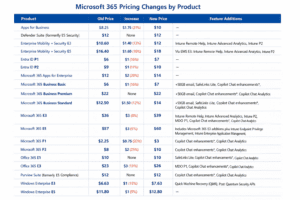
Microsoft has released a complete listing of all products and their respective pricing as of July 1, 2026.
For many organizations, this could mean thousands of dollars in additional annual licensing costs.
The Bigger Opportunity: License Alignment
The more significant issue we see is not just price increases; it’s also misaligned licensing.
Many organizations assign higher-tier licenses (such as E5) to users whose daily work primarily involves Outlook and core Office apps. While those licenses offer powerful features, they often exceed the actual needs of the role.
Before July 1, consider reviewing:
- License Usage. Run usage reports to confirm users are assigned the right tier. Many can move to lower-cost licenses without losing required functionality.
- Shared Mailboxes. Addresses like info@ or billing@ typically do not require paid licenses, yet often have them assigned.
- Renewal Timing. If you’re on annual terms, review renewal dates before the new pricing takes effect.
Microsoft 365 remains a powerful platform for productivity, security, and AI-driven work. Its value, however, is maximized when licensing aligns with actual user needs.
If you’d like help reviewing your licensing strategy before July 1, please contact us, we’re happy to assist.